Navigation
WorkAboutContactGet in touch

© 2026 Alfonso Barreiro

Spotify · UX Case Study

Recently Played Controls

Designing reversible, non-destructive controls — Pin, Remove, and Pause — that give users meaningful agency over Spotify's Home feed without degrading recommendation integrity or breaking discovery behavior.

Role

UX/UI Designer

Type

Solo · Concept

Timeline

Nov – Dec 2025

Methods

Competitive Audit · Archetype Synthesis · Constraint Mapping

Outcome

3 shelf-native controls — reversible, device-scoped, ML signal intact

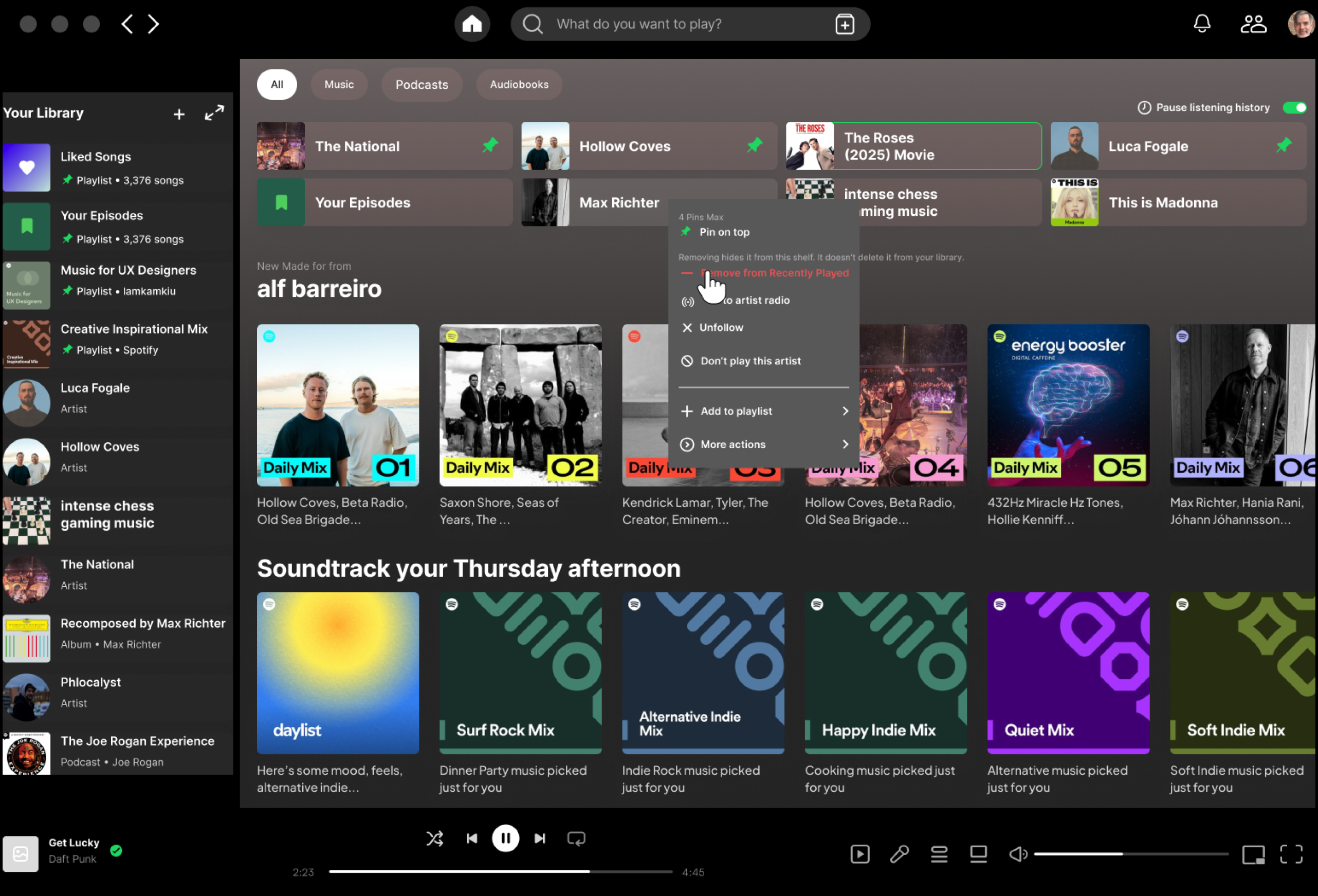
Spotify Recently Played Controls — UI preview showing Pin, Remove, and Pause controls on the Home shelf
01

Context

Spotify's Recently Played shelf sits at the top of every user's Home feed — one of the highest-visibility surfaces in the app. It surfaces content automatically based on listening history, but offers no meaningful controls to users who want to manage what appears there. No way to remove an item. No way to pin a favorite. No way to temporarily pause the feed from logging activity.

This matters because the shelf is always visible — on your own screen and on anyone else's. Shared devices, embarrassing listening sessions, and binge sessions that skew recommendations all create real friction with no available resolution. Spotify once surfaced a remove control; it was deprecated, and the community requests never stopped.

"Recently Played is highly visible on Home; users want fast, reversible control over what appears there — without harming discovery."

02

The Problem

Spotify surfaces what you've played — but gives you no way to shape what stays. The shelf fills itself. A shared device exposes your listening history. A binge session rewrites your recommendations. There's no way to intervene.

Three friction points emerged, each pointing to a different kind of control:

Clutter

The shelf gets crowded with low-signal content. Users want to surface favorites without digging — but pinning doesn't exist.

Embarrassment

Shared devices expose listening history publicly on screen. Users need a way to remove specific items — per-device, not globally.

Recommendation drift

An atypical listening session shouldn't poison future recommendations. Users need a time-boxed way to pause history logging.

03

Research & Discovery

Without live access to users, I built a structured proxy research layer: behavioral archetypes synthesized from Spotify community complaint threads, UX forum posts, and App Store reviews; a competitive audit across four platforms; and constraint interviews modeled on what Product, ML, Privacy/Legal, and Engineering typically surface in discovery. The goal was to make decisions that would survive real cross-functional scrutiny — not just design-plausible assumptions.

User Archetypes

Commuter (Ranger Dave)

Core need

Fast cleanup, focus sessions

Pain point

Shelf is noisy; can't quickly return to go-to music

What they need from this design

Pin/Remove with clear, reversible feedback

Parent (shared device)

Core need

Privacy control

Pain point

Kids' listening contaminates recommendations; shelf is visible to others

What they need from this design

Remove + Pause scoped to this device only

Explorer (heavy Home user)

Core need

Minimal friction, fast return

Pain point

Deep listening sessions overwrite shelf with rabbit-hole content

What they need from this design

Pin for fast return; Pause to protect recommendations during deep dives

Competitive Audit

I audited YouTube Music, Apple Music, and Amazon Music against the four controls in scope. Spotify currently offers none of them on-shelf. Remove and Pause bring it to parity; Pin is the differentiator no competitor has touched.

PlatformRemoveClear AllPause HistoryPin to Shelf
YouTube Music
Apple Music✓ (buried)
Amazon Music✓ (inconsistent)
Spotify (current)
Spotify (proposed)

Takeaway: Ship Remove + Pause to reach parity. Add Pin to differentiate.

Point of Reference

Point of Reference — Baseline and market snapshot showing Spotify's gap vs YouTube Music, Apple Music, and Amazon Music

User Journey Map

User Journey Map preview — Stages 1–3 of Ranger Dave's flow: Launch & Landing, Scan Recents, Choose Action
Stages 1–3 of 7

The gap between seeing a control and trusting it.

Mapping Ranger Dave’s 7-stage journey surfaced the highest-friction moment: Stage 3 to Stage 4 — from spotting a long-press affordance to committing to an action. No visual cue that the gesture existed. The shelf gave no signal that anything was interactive. That gap drove the decision to design for immediate discoverability, not power-user access patterns.

Full User Journey Map — Ranger Dave's 7-stage flow: Launch & Landing, Scan Recents, Choose Action, Apply Control, Confirm / Undo, Post-Action Review, Validate Change

Ranger Dave’s full 7-stage journey — goals, actions, pain points, and design opportunities mapped end-to-end.

04

Design Decisions

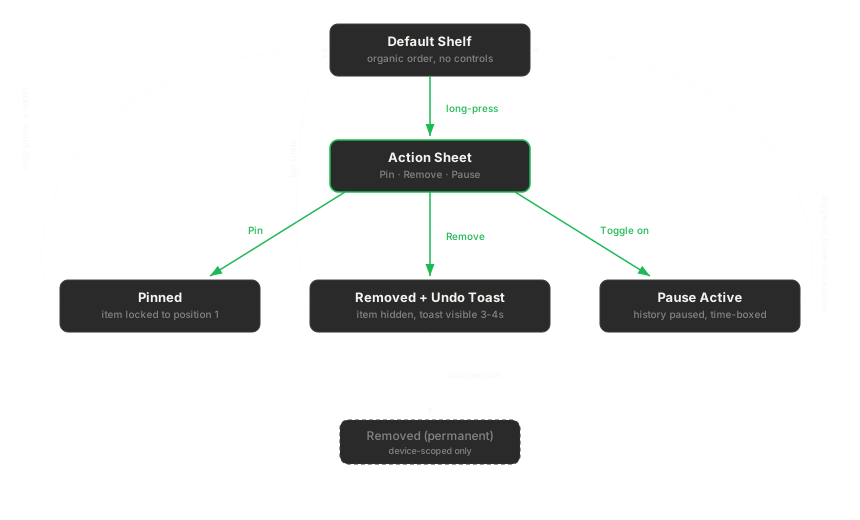
Pin, Remove, and Pause weren't the first ideas — they were what survived the filter. Early directions included global history clearing, a private listening mode, and surfacing controls from Settings. Each was ruled out: too broad in scope, too deep in the navigation stack, or too likely to degrade recommendation signals. What remained were three actions that could live on the shelf, complete in 1–2 steps, and reverse without permanent consequence.

Every decision was then filtered through one core constraint: don't break discovery. The shelf exists to surface content users want — any control that weakens that signal is out of scope.

Stakeholder Priorities — Mapped Before Any Decision

Product

Differentiation + engagement lift

Pin is the greenfield feature; Remove + Pause reach parity first

ML / Recs

Training signal integrity

Permanent pause ruled out — time-boxing is the constraint that survives

Privacy / Legal

Data handling scope

Remove is device-scoped; global deletion requires a different flow

Engineering

Sync model complexity

Pin capped at 4; chip-based state avoids a heavy backend rewrite

01

Pin

Bring your favorites to the front

Users can pin up to 4 items to the shelf. Pinned items surface in a dedicated Pinned row above the standard shelf, with drag-to-reorder and Undo support. The cap at 4 was a deliberate tradeoff: it keeps the interaction lightweight and prevents the feature from becoming a full playlist management system, which is out of scope.

Key Decisions

Cap at 4 pins: prevents scope creep into playlist management; keeps taps-to-pin ≤2.

Visible Pinned row: makes the feature discoverable; signals clearly that pinning does something.

Undo on pin/unpin: reversibility is a first-class affordance, not an afterthought.

Drag/↑↓ reorder: gives power users control over order without requiring a separate screen.

02

Remove

Clean up the shelf without losing history

Per-item removal from the shelf, scoped to the current device. Removal doesn't delete listening history — it just hides the item from the shelf. This distinction is explicit in the microcopy. Undo is available immediately post-removal. A device-scoped 'clear all' is also available for users who need a full reset.

Key Decisions

Device-scoped: satisfies privacy use case without touching global history or affecting recommendations signal.

Does not delete history: protects recommendation integrity; avoids a misleading mental model.

Undo available: keeps the action reversible; reduces CSAT risk.

Microcopy: 'Removed from this device. Doesn't delete your listening history.' — Engineering and Support both flagged this as a top priority.

03

Pause

Stop the clock on a session you'd rather not save

A time-boxed pause on history logging: 15 min, 1 hr, 3 hrs, or Until tomorrow. A persistent chip appears in the shelf while Pause is active. It resumes automatically at the selected time — no manual re-enable required. This design came directly from a stakeholder constraint: Recommendations & ML flagged that permanent pausing would degrade model training data.

Key Decisions

Time-boxed only: permanent pause would degrade ML training signal — ruled out in alignment with Recommendations & ML.

Chip + Resume affordance: makes active pause state visible; gives users an easy escape hatch mid-session.

Auto-resume: reduces cognitive load; users shouldn't need to remember to turn it back on.

Start/see/stop in ≤3 clicks: the key metric for this feature; drove the chip placement decision.

The Solution

Screen walkthrough

Long-press any item on the Recently Played shelf to reveal controls. Each action completes in 1–2 taps with an Undo safety net.

Default Spotify Home showing the Recently Played shelf — no controls visible
01

The shelf as users see it today. Long-press any item to access controls.

Action sheet revealing Remove, Don't Suggest Similar, Pause History, and Clear All options
02

Remove, Don't Suggest Similar, Pause History, Clear All — all in 1–2 taps. Microcopy clarifies scope: “Removing hides it from this shelf.”

Spotify Home shelf after removal — item gone, shelf reflowed, Undo toast visible
03

The Roses removed. Shelf reflows immediately. Undo toast available for 10 seconds.

05

Constraints & Trade-offs

Every project has a perimeter. These defined the shape of the solution — and the reasoning behind each decision matters as much as the decision itself.

Out of scope

Editing global listening history

This touches a different surface (Settings → Privacy) and a different stakeholder group. Scoping it here would expand the project beyond one sprint and dilute focus.

Out of scope

Changing ranking algorithms

Recommendation logic is owned by a separate team. Any ranking changes would require cross-team alignment that's out of scope for a shelf-level UX feature.

Out of scope

Profile privacy redesign

The privacy complaints are real, but they're systemic — not solvable by a shelf control. Addressing this here would be a band-aid on a bigger problem.

Constraint

Pause must be time-boxed

Recommendations & ML: permanent pause degrades training signal quality over time. Time-boxing was the negotiated middle ground.

Constraint

Remove is device-scoped only

Privacy/Legal: global history deletion requires explicit user confirmation flows and different data handling. Device-scoped remove is a much lighter lift with the same UX benefit for the target use case.

Constraint

Pin cap at 4

Engineering: a lightweight chip-based sync model breaks down past 4 items. Keeps the feature fast and avoids overbuilding into playlist territory.

06

Design Principles

These weren't decorative values — they were active filters. Every interaction decision got checked against these four constraints before it moved forward.

Reversible by default

Every action has an undo. No permanent changes without confirmation.

Device scope is explicit

Actions that affect only this device say so in microcopy — always.

On-shelf, 1–2 steps

Controls live in context. No deep navigation, no modal stacks.

Don't break discovery

The shelf exists to surface content. Controls that degrade that signal are out of scope.

07

Validation Plan

This is a concept project — there were no live metrics to report. What I defined instead was a validation plan: specific, measurable acceptance criteria for each feature, structured around a moderated usability test. These are the thresholds I'd use to gate a launch decision.

FeatureMetricThreshold
PinTaps to pin≤ 2
PinReorder task time< 3s
RemoveTime to remove≤ 6s
PauseStart / see / stop Pause≤ 3 clicks
AllError rate≤ 5%
AllTop-2 CSAT≥ 80%
AllUMUX-Lite lift+8

Proxy metrics: no live data. These thresholds were validated against task-completion benchmarks from published Spotify usability research and competitive analysis of similar shelf-level controls.

08

Reflection

The most interesting design challenge here wasn't the UI — it was the scope constraint. Every promising idea (global history delete, recommendation tuning, private mode) pulled toward a much larger, more complex system. The discipline of asking "can this be done on-shelf, in 1–2 steps?" killed more bad ideas than any critique.

Mapping stakeholder priorities did real work. Understanding what Product, ML, Privacy/Legal, and Engineering each cared about meant Remove and Pause were designed with the right constraints from the start — not retrofitted after pushback. Device-scoping Remove and time-boxing Pause weren't compromises; they were the correct decisions once the full system was visible.

In retrospect, I led with Pin — the differentiation play — when Remove was the higher-urgency fix. Real users filing complaints weren't asking for curation; they were asking for relief. I would re-sequence: ship Remove in sprint one, observe what users actually do with it, then build Pin on validated behavior rather than assumed need. That sequencing change is a judgment call, not a scope call — and it took mapping the full constraint picture to see it clearly.

If I had more time

Run moderated usability tests with 5–6 participants across the three archetypes to validate the 1–2 step constraint and surface edge cases around the Pause chip visibility.

Prototype the Pinned row reorder interaction for mobile — drag handles on a touch surface have real accessibility and ergonomics trade-offs that need testing.

Explore the Pause state persistence across devices. The current design is device-scoped, but a user who pauses on mobile and switches to desktop has an ambiguous experience.

Document the handoff spec more thoroughly — 44×44 tap targets, contrast ratios, and the exact Undo timeout window are all unresolved in the current prototype.

Case Study Slides

The full narrative deck — if you want to go deeper on any section.

Use arrow keys or click to advance — no Figma account required.

Next Case Study

Wayfarer — Travel Planning Site

Back to Portfolio